
M2 Version 2
All new functionality added to the already powerful M2 software!
• Advanced Part View markup
• Multi-run analysis via a Runs Database
• Customize your reports with the Template Editor
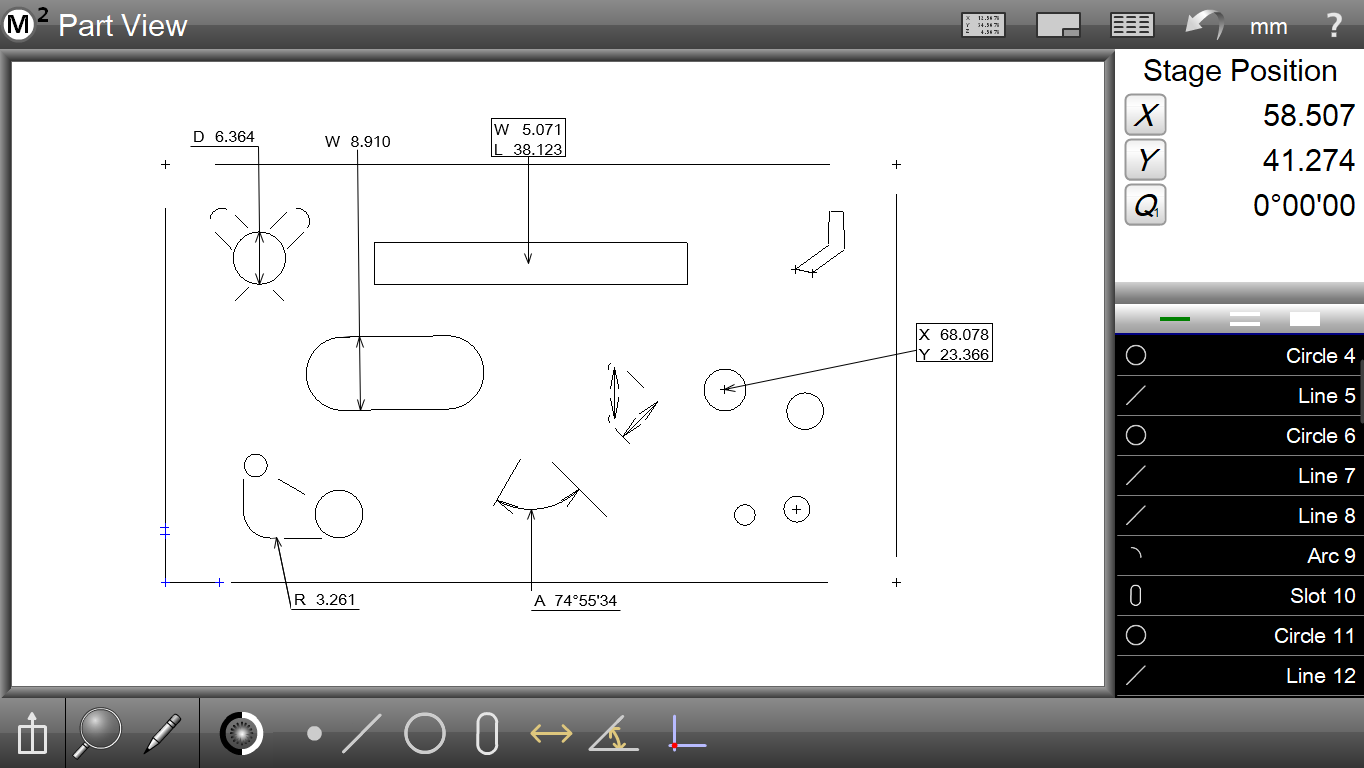
Part View Markup and Annotation
Gain access to instant feature markup tools using the part view markup menu. Add customized feature data to your part view, including measurement results and tolerance information.
Runs Database and Statistics
Track and analyze measurement run results for your part programs. View past measurement results quickly and easily using the tabbed runs database program results view. Perform quick cross-run analyses of feature results using the Pivot data mode. Add quick statistical feedback including min, max, range, average, and 6 sigma to your data for more detailed analyses of result trends and measurement repeatability.
Report Template Editor
Report templates can now be created and assigned to meet the formatting requirements of specific part inspection routines. Customize and save multiple report template styles for use in various part programs.
Enhanced User Message Step
The User Message Step has been enhanced to support variable based “ask” prompts. Operator-entered data can now be stored in a variable, and reported throughout the system user interface and in measurement reports.
Formula Evaluation
Generate custom formula calculations utilizing measurement result data and standard mathematical operators and trigonometric functions. Perform simple and complex measurement calculations directly in the M2 software.